The Link Beneath the Link: Finding a Report’s Original Source
Finding a report’s original source helps you see what a claim rests on, what context surrounds it, and where the citation trail stops.
The most common mistake when finding a report’s original source is stopping at the first link in the article. That shortcut can leave you with another news story, a press release, or a quotation copied several times—and no clear view of what the claim rests on. A better approach is to follow the references until you reach the underlying document or statement, then mark the point where the trail ends.
There is no single route for every story. A report may link directly to a court filing, point to an agency notice, cite a named person, or offer only a vague reference to “documents reviewed.” The right method depends on what the article says its evidence is and what kind of source could reasonably support that claim.
Choose the trail
Three approaches cover most citation trails: follow the article’s links, search for the named source, or request a source record from the organization responsible for it. They can overlap, but beginning with the approach that matches the evidence saves time and makes it easier to notice when you have reached a secondary account rather than an original source.
- Follow the link chain. Best when the report contains citations, embedded links, document names, or a quoted statement that leads to another page. It is usually the quickest route, but a linked page may itself be a summary.
- Search by source details. Best when an article names a filing, agency, meeting, report, or speaker but does not link to the record. Distinctive phrases, document titles, docket identifiers, and institution names can narrow the search.
- Ask for the record. Best when a source is described but not publicly linked, or when a document appears to be held by an institution. A newsroom, public agency, court clerk, or organization may be able to point to the relevant material, though access and procedures differ.
Think of each link as a forwarding address on an envelope: it tells you where to look next, not whether the recipient is the originator. A report that links to another outlet’s account has provided a trail, but not necessarily an original record.
Read the link labels
Before opening anything, note the wording around the link. “The filing says” suggests a document; “according to the agency” may lead to a statement, webpage, or spokesperson; “reported by” points to another publication’s work. Those distinctions are clues about the kind of evidence you should expect, not proof that the linked page contains it.
Open the link and identify who published the page and what it actually is. An official agency release is an original statement from that agency, but it is not automatically the underlying data or a complete account of an event. A newsroom’s document viewer may host a primary record, while the surrounding explanation remains the newsroom’s interpretation.
When a link goes to a page with several attachments, look for the item named in the report: a transcript, order, agenda, dataset, letter, or recorded statement. Check whether the document’s title and issuing body fit the article’s description. If the link leads to a search page or a general homepage, treat it as a pointer rather than as the source itself.
Follow the references
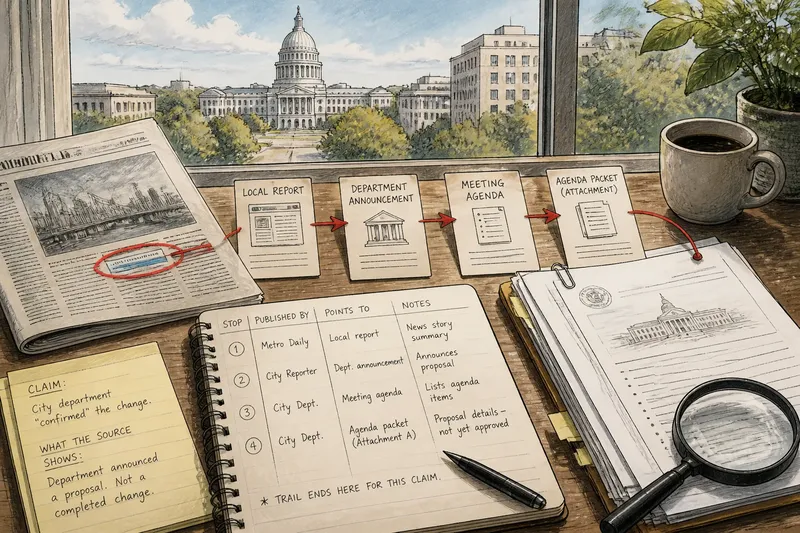
For a multi-link trail, keep a simple note of each stop: who published it, what material it points to, and what the next reference says. This need not become a research project. A few lines in a notes app or a browser tab title can prevent a secondary report from blending in your memory with the record it describes.
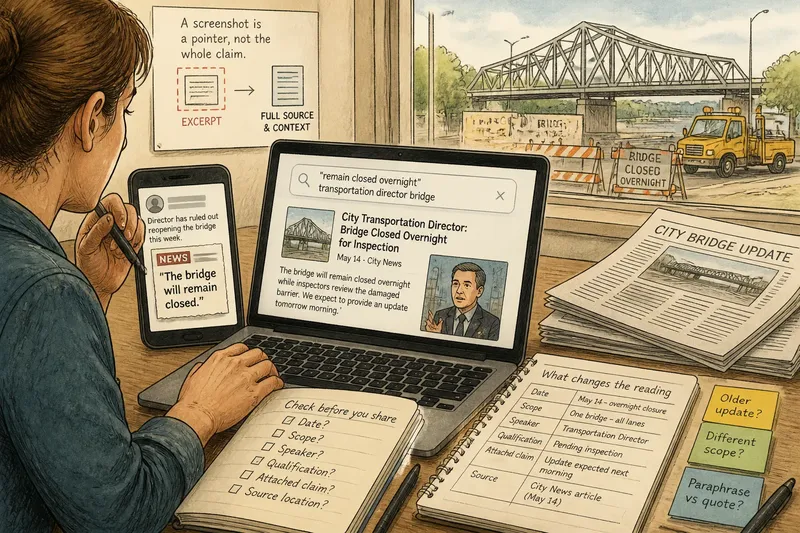
At each stop, search within the page for the person, document title, or distinctive phrase used in the claim. Then inspect the context around the passage. A quotation may be copied accurately but stripped of a qualification in the sentence before it; a summary may attribute a point to a report that the report itself attributes to someone else.
Say you read that a city department “confirmed” a change and the article links to a local report, which links to a department announcement. You open the announcement and find that it describes a proposal, not a completed change. The observable result is a more precise account: the department announced a proposal, while the news report’s wording presents it as settled.
Record the distinction rather than merely saving the last URL. “Department announcement—proposal described” is more useful later than a bare link because it preserves what the source supports and what it does not.
Search without a link
When an article names a source but offers no direct link, search using the most specific details in the text. Combine the institution or speaker’s name with a document type, meeting name, date phrase, or unusual wording from the quotation. If a phrase is distinctive, searching it in quotation marks can help locate copies or references, but a matching phrase alone does not establish which copy came first.
For government records, start with the relevant agency, legislature, court, or municipal site. Look for sections labeled press releases, meeting materials, decisions, filings, or records. For a company statement, check the company’s investor-relations or newsroom pages; for a speech or interview, look for a full transcript, recording, or original post from the speaker’s verified account.
Search results can surface mirrors, archived pages, syndicated copies, or commentary before the issuing organization’s page. Compare the publisher, document title, and any identifying details. If the page is a reproduction, it may still contain the record, but be clear about who is hosting it and whether the original publisher can be located.
Use broader searches only after trying the exact names and terms available. A general query can return pages about the topic rather than the source you need, creating the appearance of progress without moving the trail forward.
When does the trail stop?
What counts as an original source?
An original source is the document, statement, recording, dataset, or direct account at the origin of the particular claim being checked. The label depends on the claim: an agency release is original evidence of what the agency announced, but may not be original evidence of the event the agency describes.
What if the link leads to another news report?
Follow that report’s citations and identify whether it links to a document, quotes a speaker, or refers to unnamed material. If it offers no further path, you have reached the end of the accessible trail, not necessarily the underlying source.
How can I tell if a document is complete?
Check for a title page, issuing organization, date or identifying label, page sequence, attachments, and a note about redactions or omitted material. A partial excerpt can still be useful, but do not treat it as the whole record unless the publisher says it is complete.
What should I do when the source is unavailable?
State the limit plainly: the report cites a document or person that you could not access, and the underlying material remains unverified from the available trail. You can contact the publisher or relevant institution for a pointer, while keeping the claim separate from what you personally can inspect.
Recognize a dead end
A trail has stopped when the available links lead only to summaries, the original material is not named, or access is restricted and no usable version is available. Other stopping points include a deleted page with no accessible archive, a source described only as confidential, or a statement attributed to someone without a recording or transcript.
Stopping is not the same as disproving the report. It means you cannot independently check the underlying material through the route available to you. Keep that boundary visible in your notes and in any discussion of the claim; confidence in a secondary account should not quietly become certainty about a source you have not seen.
It can help to distinguish three outcomes: the source is located and supports the specific wording; the source is located but supports a narrower or different claim; or the source cannot be reached. These are not grades for the journalism. They describe what the citation trail lets a reader verify.
Choose your approach
Use link-following when the article already gives a meaningful citation, since it is usually the most direct way to preserve the chain. Use targeted searching when the source is named but the link is absent or broken. Contact the institution or publisher when the source is described clearly but not publicly available, and decide whether the effort matters to the claim you are assessing.
For a routine check, one pass is often enough: identify the article’s exact wording, open the link, confirm the publisher and document type, then follow one further reference if the page points onward. For a consequential claim, take more care to compare the report’s paraphrase with the source’s own language and note any missing context.
Finding a report’s original source is not only a hunt for a more authoritative page. It is a way to separate what a document says from what an article says the document means. When the trail ends, naming that boundary is still a useful result: it tells you what is known from the accessible record and what remains outside it.